How to redeem a code in the Rockstar Games Launcher
Rockstar games are activated in the Rockstar Games Launcher, not on Steam. Here are the steps, and what to do if the code is rejected.

If you buy GTA V, Red Dead Redemption 2 or another Rockstar game as a Rockstar code, the game is added to your Rockstar account through the Rockstar Games Launcher. The code works once, and the game stays on whichever account is signed in when you redeem it.
Redeeming the code
- 1Download the Rockstar Games Launcher from rockstargames.com if you don't have it, and sign in with your Rockstar account. If you don't have one, you can create it there.
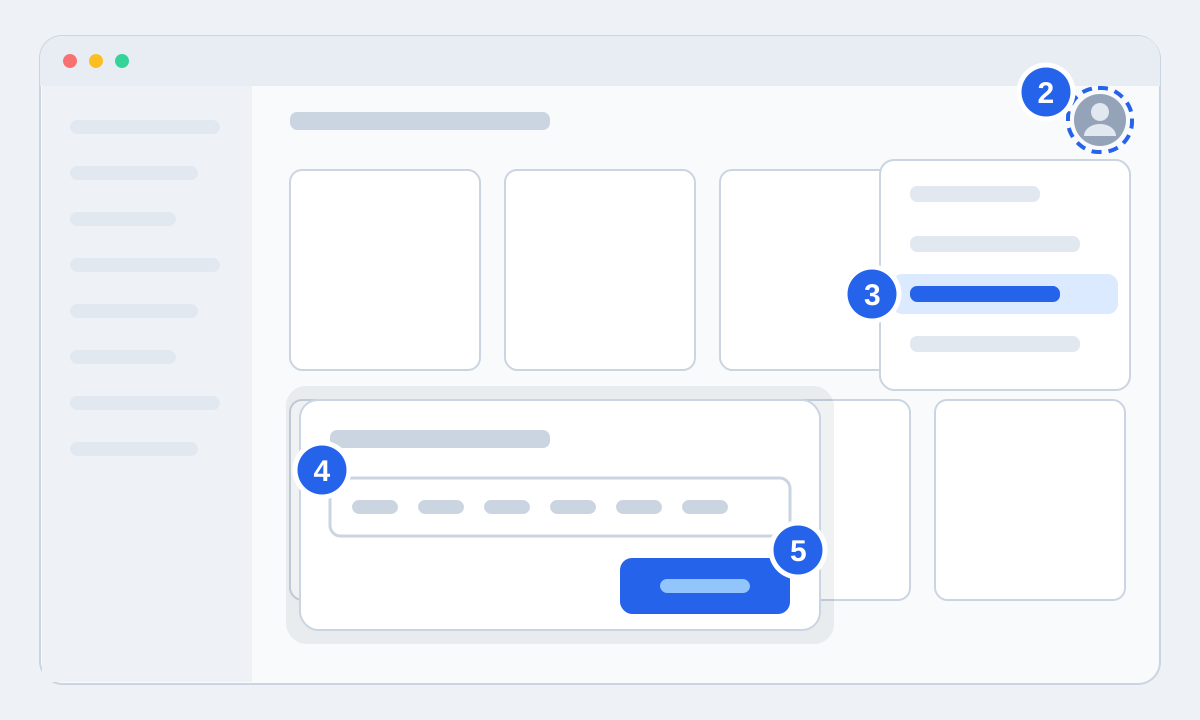
- 2Click your profile picture in the top right corner of the launcher.
- 3Choose Redeem Code.
- 4Paste the code from your order page and press Check to make sure it's right.
- 5Tick the box to confirm what the account will get, then press Redeem. The game now shows under Games, where you start the install.
If the code won't go through
Wrong code: Copy it straight from your order page instead of typing it, and look for a space at the start or end. The Check button tells you whether the code was read correctly before you redeem it.
Already used: If you have more than one Rockstar account, check those first. If that's not it, send us your order number. A code that doesn't work is a fault we fix: you get a new code or your money back.