How to redeem an Xbox code
Xbox codes attach to your Microsoft account, not the console. Here are three ways to redeem them.
An Xbox code is 25 characters long and is redeemed on your Microsoft account. The game follows the account, not the console, so you can download it again on a new Xbox later. It makes no difference whether you redeem on the console, a PC or your phone.
On Xbox Series X|S and Xbox One
- 1Sign in with the Microsoft account the game should belong to.
- 2Open the Store app.
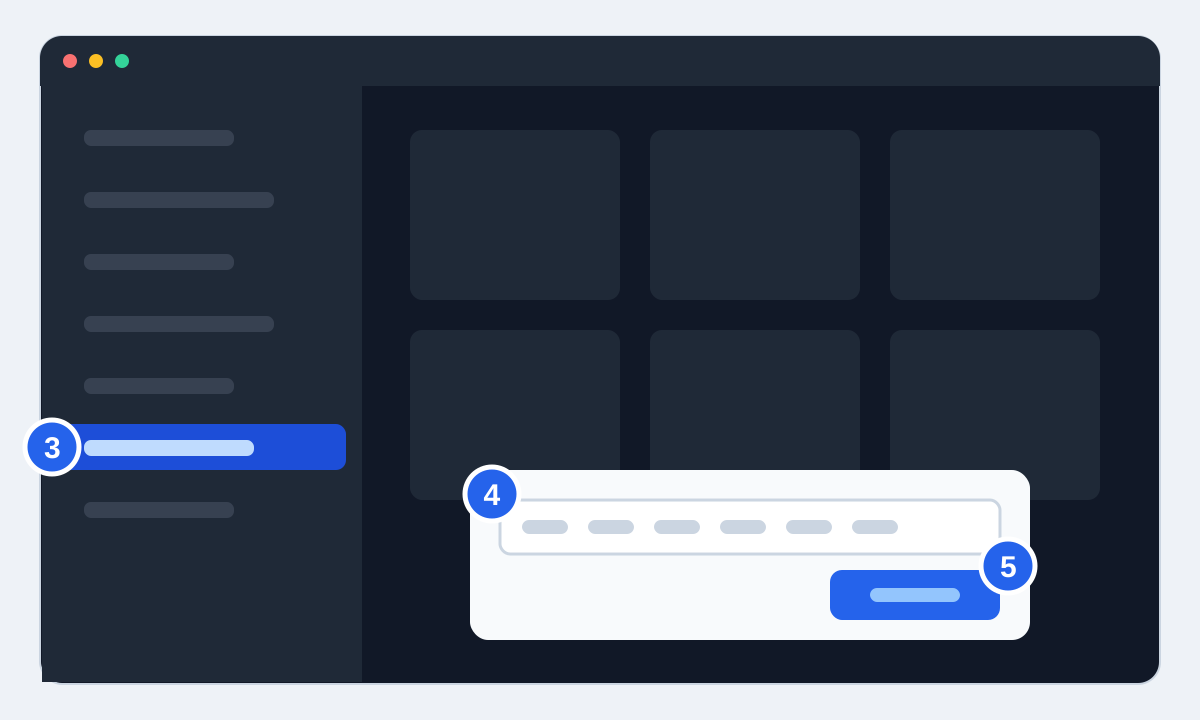
- 3Open the side menu by moving all the way left or pressing the View button (the one with two small squares), and choose "Redeem".
- 4Enter the 25 characters. The hyphens are filled in for you.
- 5Confirm. The game is added and you can install it from "My games & apps".
In a browser, on your phone or PC
Go to redeem.microsoft.com, sign in with the same Microsoft account you use on your Xbox, and paste the code. If your console is set up for remote installs, you can start the download from the Xbox app on your phone and the game will be ready when you get home.
PC games and Xbox Play Anywhere
On Windows, redeem in the Microsoft Store or the Xbox app through your profile picture, or use the same website. Check the product page before you buy: a code for Xbox consoles doesn't automatically include the PC version, and the other way round. If it says Xbox Play Anywhere, one purchase covers both.
If the code is rejected
If it says the code has already been used, check whether you have more than one Microsoft account, such as an old Hotmail address. If it's rejected because it isn't valid in your country, the code was made for a different region than the one your Microsoft account is registered in. We don't recommend changing your account's country to force a code through: it can affect your balance and subscriptions.
If you can't get it to work, send us your order number. If the code doesn't do what the product page said, you get a new one or your money back.